
An MFA fatigue attack (also called push bombing or prompt spamming) floods a victim with repeated authentication requests until they approve one by accident or frustration, handing an attacker access despite MFA being switched on. The single biggest fix is to stop relying on simple approve/deny push prompts: enable number matching, add context to every prompt, throttle repeated requests, and move your highest-risk accounts onto phishing-resistant methods like FIDO2.
TL;DR:
- Enabling number matching, prompt context, throttling, and phishing-resistant methods like FIDO2 significantly reduces the success of MFA fatigue attacks.
- Detecting volume spikes, repeated denials, new device enrollments, and suspicious activity immediately after login improves detection of ongoing MFA fatigue campaigns.
- After an attack, it is critical to revoke sessions, block suspicious devices, investigate activity, and re-enroll MFA with hardware-based solutions to prevent recurrence.
- FIDO2 and WebAuthn offer strong protection by binding credentials to specific devices and origins, but require careful deployment and fallback policy management.
- Basic configuration fixes and targeted phishing-resistant MFA deployment should be prioritized for small teams with limited time and resources.
Table of Contents
- What is an MFA fatigue attack and how does it unfold?
- What detection signals reveal an active MFA fatigue campaign?
- How can you prevent MFA fatigue and prompt bombing?
- What should you do immediately after a suspected MFA fatigue compromise?
- Why does FIDO2/WebAuthn change the threat model entirely?
- NicoByte's take: what small teams should actually do this month
- An editorial take on where the real risk sits
- Sources
What is an MFA fatigue attack and how does it unfold?
An MFA fatigue attack rarely starts with the prompts themselves. It starts with stolen credentials, usually harvested through phishing, credential stuffing against reused passwords, or a data breach that dumped a username and password combination onto a criminal marketplace. Once an attacker has valid credentials, they hit a wall: MFA. That's when the fatigue tactic kicks in.
The attacker (or, more commonly these days, an automated tool) repeatedly initiates sign-ins using the stolen credentials. Each attempt fires a push notification to the victim's phone. Do it at 2am, during a meeting, or twenty times in a row, and plenty of people will eventually tap "approve" just to make the notifications stop. That single tap hands over full account access, no password guessing or technical exploit required.
This isn't a theoretical risk. MITRE ATT&CK formally tracks this behaviour under technique T1621, which covers attackers abusing MFA mechanisms, including prompt bombing and social engineering victims into approving requests they never intended to authorise. Having a named, catalogued technique matters for defenders because it means detection logic and response playbooks already exist, rather than each organisation reinventing the wheel.
Push bombing is the crude version of this attack. The more dangerous evolution is the adversary-in-the-middle (AiTM) proxy. Instead of just spamming a prompt and hoping, tools such as EvilProxy and Tycoon 2FA sit between the victim and the legitimate login page, relaying the entire authentication flow in real time. The victim thinks they're logging into Microsoft 365 normally; the attacker's proxy captures the session token the moment MFA completes. Reporting on this ecosystem shows it's easier than ever to rent these kits as a service, which means the barrier to running a convincing MFA bypass campaign has dropped sharply. AiTM defeats push AND one-time codes, because it never needs to guess or spam anything. It just steals the finished session.
A third, sneakier variant is the downgrade attack. Even organisations that have deployed strong authentication can be undermined if their policy allows a fallback. Research into authentication downgrade attacks shows that JSON and CSS manipulation on the client side can hide a phishing-resistant option from the login screen entirely, quietly steering the user towards a weaker method the attacker can still defeat.
Common patterns worth recognising:
- Off-hours targeting: campaigns often run in the early hours when a victim is groggy and more likely to tap without thinking.
- Volume bursts: dozens of prompts within a few minutes, rather than the occasional retry a genuine user generates.
- Social engineering follow-up: some attackers pair the prompt spam with a phone call impersonating IT support, asking the victim to "just approve it to fix the issue."
- Session hijack over credential theft: with AiTM kits, the attacker doesn't need your password again after the first successful relay. They already have a live session.
Understanding which variant you're facing changes your defence. Push bombing is beaten with friction and context. AiTM needs origin-bound cryptography. Downgrade attacks need policy enforcement that leaves no fallback door open.
What detection signals reveal an active MFA fatigue campaign?
The clearest sign of an MFA fatigue campaign is volume: a single account generating far more authentication prompts in a short window than it ever has before. Most identity providers log this by default, but very few organisations actually alert on it, which is why campaigns often run for hours before anyone notices.
Build detection rules around these behaviours:
- Prompt volume spikes — five, ten, or more MFA requests for one account within a fifteen-minute window is not normal user behaviour; it's a script or a person deliberately pushing prompts.
- Denial-then-approval patterns — a sequence of several rejected prompts immediately followed by one accepted prompt is a near-perfect signature of an exhausted victim caving under pressure.
- New MFA device enrolment right after approval — attackers often register their own authenticator app or device the moment they get in, so they don't need to repeat the fatigue attack next time.
- Impossible travel and anomalous IP geolocation — a login from a country or region the account has never touched before, arriving minutes after an approval, is a strong corroborating signal.
- Post-authentication changes — new mailbox forwarding rules, inbox rule creation, or sudden privilege escalation requests are the attacker consolidating access, and they happen fast.
None of these signals alone proves compromise, but two or three together in sequence should trigger an automatic alert, not a ticket that sits in a queue until morning. Reporting on real intrusions shows that monitoring only failed logins misses the attack entirely, because the successful approval is, from the identity provider's point of view, a legitimate authentication event. The compromise only becomes visible in what happens afterwards.
Pro Tip: Set your SIEM or identity provider's conditional access logs to flag any account with more than three MFA denials in ten minutes, and route that alert to a human, not just a dashboard nobody checks until Monday. Speed is everything here.
If an alert does fire, the immediate response should be to treat the account as compromised until proven otherwise: force a re-authentication challenge through a separate, verified channel, and hold off on trusting the session even if the login itself looks geographically plausible. Waiting for "more evidence" before acting is how a fifteen-minute intrusion turns into a week-long one.
How can you prevent MFA fatigue and prompt bombing?
Layered defence beats any single control, and the layers that matter most are the ones that add friction or context to the approval decision itself. Microsoft's own testing found that number matching and additional context in push prompts eliminated MFA fatigue attacks in environments where those features were switched on. That's a striking result for what amounts to a configuration change rather than a hardware rollout.
Number matching forces the user to type a code shown on the login screen into their authenticator app, rather than tapping a single "approve" button. It sounds like a small change. It isn't. It converts a mindless reflex tap into a deliberate action that requires the user to actually look at what they're confirming, which single-handedly breaks the "spam until they cave" strategy.
Beyond number matching, build your defence in these layers:
- Rate limit and throttle prompts so an account can't receive more than a handful of push requests within a short window before the identity provider locks further attempts and raises an alert.
- Add context to every prompt — application name, requesting IP address, and approximate location, so a user in Manchester sees a login attempt from an unfamiliar country and instinctively distrusts it.
- Enforce risk-based conditional access — factor in device posture, whether the device is a known, registered one, geolocation, and a calculated sign-in risk score before granting access, rather than treating every successful MFA approval as equally trustworthy.
- Automate remediation for at-risk accounts — a detected fatigue pattern should trigger an automatic forced password reset and session block, not wait for a human to review it hours later.
- Give users one simple rule — never approve a prompt you didn't request, and make reporting a suspicious prompt as easy as forwarding a phishing email.
Industry analysis of MFA bombing campaigns consistently finds that no single control fully closes the gap; it's the combination of throttling, contextual prompts, number matching, and risk-based authentication working together that pushes success rates for attackers down to near zero.
Why this matters in numbers: Microsoft's production testing showed a marked drop in accidental approvals once number matching and context were enabled, essentially closing the exact loophole push bombing exploits.
User training deserves its own mention here, separate from technical controls, because no configuration change stops a determined social engineer who also phones the victim pretending to be IT support. Staff need to understand three things clearly: MFA prompts they didn't trigger are always suspicious, IT support will never ask them to approve a prompt over the phone, and reporting a weird prompt takes thirty seconds and carries zero blame. Organisations that treat MFA fatigue purely as a technology problem and skip this training piece consistently leave their softest target, the exhausted employee at 11pm, completely exposed.
For teams managing authentication infrastructure themselves, understanding how proxy authentication methods actually route and validate requests helps clarify exactly where a relay attack can insert itself, and where hardening effort is best spent.
What should you do immediately after a suspected MFA fatigue compromise?
A suspicious approval demands containment first, investigation second, and full remediation only once you're confident the attacker's foothold is genuinely gone. Speed matters more than thoroughness in the first ten minutes.
- Revoke all active sessions immediately. Resetting a password alone does nothing against a live session token, particularly one captured through an AiTM relay. Session and token revocation has to happen alongside, not after, the password reset.
- Block the suspicious device and any newly enrolled MFA method. If the attacker registered their own authenticator app during the compromise window, that device needs removing from the account before anything else.
- Investigate post-authentication activity in detail. Check for new inbox forwarding rules, unfamiliar OAuth app grants, lateral movement into other systems, and any new administrative credentials created during the suspected window.
- Rotate credentials and validate service tokens. Don't stop at the user's own password. Check whether the compromised account had access to shared service accounts, API keys, or application tokens that also need rotating.
- Re-enrol MFA using a phishing-resistant method for the affected account, rather than simply re-adding the same push-based authenticator that got them into trouble in the first place.
- Run a lessons-learned review covering how the initial credentials were likely obtained, whether number matching was active at the time, and what policy or logging gap let the campaign run as long as it did.
Treat every step as mandatory, not optional, even when the login "looks fine" on the surface. A relayed session token doesn't announce itself, and the cost of over-reacting to a false alarm is far lower than the cost of under-reacting to a real one.
Why does FIDO2/WebAuthn change the threat model entirely?
FIDO2 and WebAuthn defeat MFA fatigue and AiTM relay attacks for a structural reason, not just a procedural one: the cryptographic credential is bound to both the website's origin and the physical device that created it. There is no prompt to spam, no code to relay, and no shared secret an attacker's proxy can capture, because the private key never leaves the authenticator and the signature it produces is worthless on any domain other than the genuine one. The FIDO Alliance built the standard specifically to close this class of vulnerability, and it's the reason phishing-resistant authentication has become the recommended baseline for high-risk accounts across the industry.
That doesn't mean FIDO2 is a drop-in fix with no trade-offs. Consider before rolling it out:
- Hardware cost and distribution — physical security keys or platform authenticators need procuring, distributing, and tracking, which is a real logistical task for anything beyond a handful of privileged users.
- Lost-key recovery process — you need a documented, tested fallback for when someone loses their key, ideally one that doesn't quietly reopen the door to a weaker method.
- Browser and platform support gaps — legacy applications and some internal systems may not support WebAuthn yet, which forces a hybrid state you'll need to manage.
- Policy enforcement, not just deployment — FIDO2 hardware can be undermined by downgrade attacks that hide the secure option unless conditional access policies explicitly block fallback to weaker methods.
The practical rollout path most organisations follow starts narrow: pilot FIDO2 with executives and IT staff who have the most sensitive access, refine your conditional access policy based on what breaks, then broaden the rollout in phases rather than flipping the switch organisation-wide on day one.
Pro Tip: Monitor for "method degradation" after rollout, meaning any account that quietly reverts to SMS or push after being enrolled in FIDO2. That reversion is either a support workaround someone forgot to close, or a sign the downgrade attack is already in progress.

NicoByte's take: what small teams should actually do this month
Most small businesses we work with across Bolton, Manchester, and Lancashire aren't short on awareness of MFA fatigue attacks; they're short on time to actually fix it. Here's the honest priority order:
- Audit first. Check whether number matching is even switched on in your identity provider. Many organisations enabled basic MFA years ago and never revisited the settings.
- Fix the quick wins. Number matching, prompt throttling, and context in push notifications are usually a configuration change, not a purchase.
- Pilot phishing-resistant MFA for your owner accounts, finance staff, and anyone with admin rights, before rolling it wider.
If that audit sounds like a job you don't have a spare afternoon for, that's exactly the gap Nicobytesolutions closes for local businesses, with a straightforward cybersecurity audit and fixed pricing so there's no surprise invoice at the end of it.
An editorial take on where the real risk sits
The conventional advice on MFA fatigue attacks stops at "enable number matching," and while that's genuinely effective, it treats the problem as solved once the checkbox is ticked. It isn't. AiTM proxy kits don't care whether you've got number matching, because they relay the whole session rather than spamming a prompt, and that's the gap most small organisations haven't clocked yet.
What's overrated is push notification MFA as a long-term answer for anyone with real access, finance, admin, or owner accounts. What's underrated is policy enforcement around fallback methods; a beautifully deployed FIDO2 key means nothing if conditional access still lets someone downgrade to SMS when it's convenient.
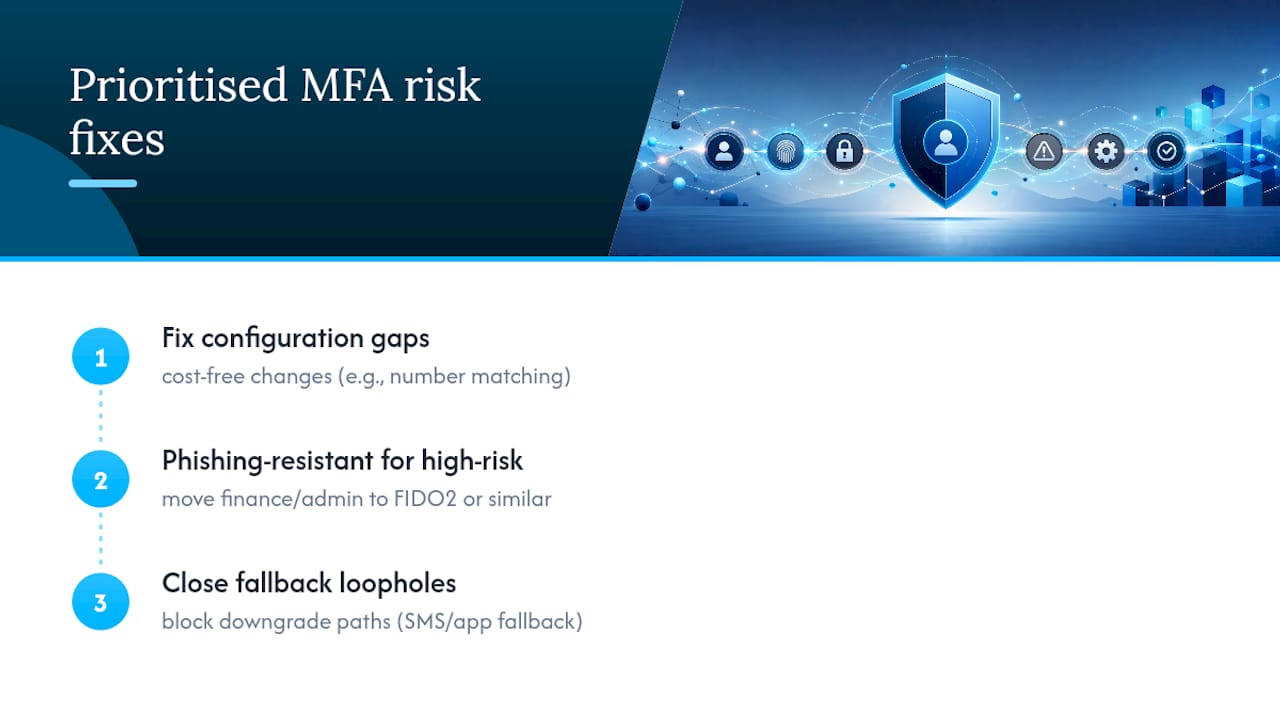
Prioritise this order: fix the configuration gaps that cost nothing, then move your highest-risk accounts to phishing-resistant authentication, then close the fallback loopholes that quietly undo all of it. Skipping straight to buying hardware keys while leaving downgrade paths open is spending money to solve half a problem.
— NicoByte